A donation box by the exit collects from people who are already leaving. A Marker beside the tank collects from people who are still looking at the reason to give. Everything in this article exists to shorten the distance between the feeling and the tap.
The loop
Build
Stack content blocks into an Experience. Free, and no card.
Preview
Open it on your own phone before anyone else sees it.
Publish
It gets a public link that works anywhere you can paste a URL.
Make it physical
Point a Marker at it and put the Marker where the question gets asked.
Then it starts again. Stats tell you which Markers get used and which questions visitors keep asking, you change the Experience, and the Marker on the wall is already pointing at the new version. Nothing gets reprinted.
Connect Stripe first
- 1
Open Account
Scroll to the Payments & donations section, or go straight to getnearfield.com/account#payments.
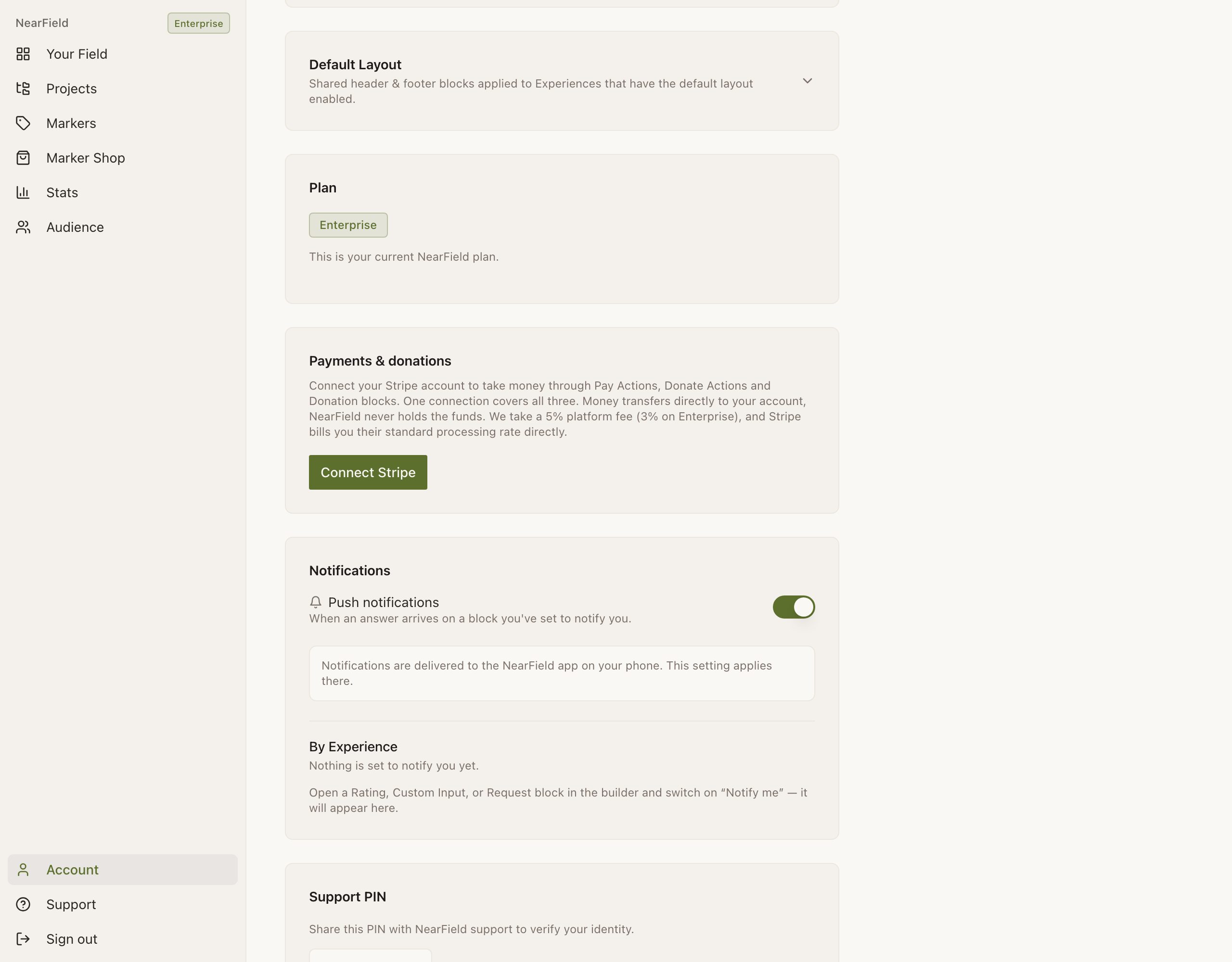
The Stripe connection card sits between Plan and Notifications. Before you connect, the button reads Connect Stripe. - 2
Press Connect Stripe
Stripe's own onboarding opens: business details, a bank account, identity verification. How long it takes is Stripe's process, not NearField's.
- 3
Come back and check it says Connected
The section reads Connected to Stripe with the last characters of the account id. A warning instead means Stripe has not finished clearing you. Press Finish setting up Stripe.
Which of the three money blocks
| Block | Shape | Reach for it when |
|---|---|---|
| Donate | A one-tap Action. Suggested amounts default to $10, $25 and $50, with a custom amount allowed. | The whole Marker is the ask: a conservation appeal beside the animal it funds. |
| Pay | The same machine framed as a transaction. Can be one fixed price with no picker, and asks for a reference by default. | There is a thing being bought: a day pass, a workshop place, a print. |
| Donation | An inline block with a prompt, a description and a thank-you, sitting in the flow of a longer page. | The ask belongs at the bottom of a page that is mostly about something else. |
Choosing the amounts
Three presets are a row on the phone, and the middle one is the one most people press. Put the number you actually want in the middle, not at the top.
- The presets default to $10, $25 and $50. Move them up rather than down. A row starting at $5 has told the visitor that $5 is the expected gift.
- Allow a custom amount keeps the generous visitor. The custom field accepts $1 to $5,000; anything outside that is refused with Enter an amount between $1 and $5000.
- For a Pay Action, one fixed price and no picker is faster than three choices. A day pass has a price.
- Ask for a reference puts a short field above the button: a room number, a table, an invoice. Switch it on when you will have to reconcile the money against something, and off for a gift.
What the visitor goes through
Your prompt, then the amount chips, then Other amount if you allowed it, then the optional reference, then a button that reads with the amount in it, such as Donate $25. Tapping it redirects to Stripe Checkout in the same tab, which matters: a new tab loses the trip back on a phone that arrived by tapping a Marker.
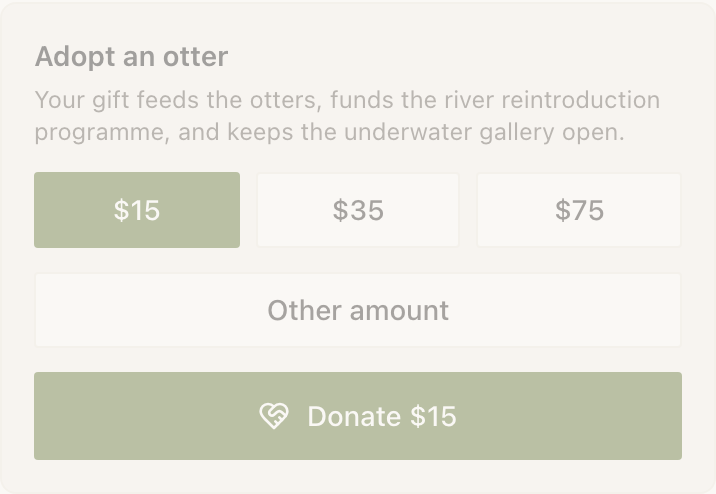
After paying they land on a confirmation page showing the amount, your thank-you copy, and a line saying Stripe will email a receipt. If they navigate back to your Experience, the block itself shows a summary: a filled heart, the amount, your thank-you in italics, and a Donate again link. A failed payment says plainly that they were not charged and offers to retry the same amount.
What lands in your account
- The charge is created on your own Stripe account, not on ours. Funds settle to you on your normal Stripe payout schedule.
- Stripe's processing fee is billed to you, by Stripe. NearField does not collect it and does not mark it up.
- NearField takes a flat platform fee of 5%, or 3% on Enterprise.
- Refunds and disputes debit your balance and stay between you and your donor. NearField is not in the middle of them.
| On a $25 donation | Who takes it |
|---|---|
| $1.25 | NearField's platform fee, at 5%. On Enterprise it is $0.75. |
| Stripe's own published rate for your country | Stripe, billed to you directly. |
| Everything else | You. |
Reading what came in
- Stats shows the amount under the Actions tile whenever money came in during the period ("$240 collected") rather than giving it a tile of its own.
- The Experience's own report carries a Donations section: total raised, average donation, and a recent-donors table five rows at a time, showing an email or an italic Anonymous.
- The insight deck flags drop-off directly: {n} people started to donate and {m} finished. The gap is Stripe Checkout: the page can only ever record that someone set out, and the completion comes back from the server.
That drop-off number is the one worth acting on. A wide gap usually means the amount was wrong for the moment, not that the visitor changed their mind about you.
When the button says not connected
NearField keeps a stored copy of whether Stripe says your account can take charges, refreshed whenever you open Account. If a live block reads Payments not connected yet after you finished onboarding, open Account once and reload the Experience. If NearField cannot read the state at all, the block behaves as though you are connected. A dead button costs a real donation, and an optimistic one costs one clear error message.
Inside the NearField iOS app, money blocks render as an inert card explaining that payments happen on the published page. That is an App Store requirement rather than a NearField choice, and it does not affect visitors, who always see the live form.
Example
Harbour Point Aquarium
Harbour Point puts a Donate Action on the Marker beside the sea turtle rehabilitation tank, the one exhibit where the money and the animal are visibly the same story.
Heading: Help us get Marigold back to sea. Description: two sentences on what her care costs a week. Suggested amounts $15, $40 and $100, with a custom amount allowed and no reference field. Thank-you copy: That is another week of fish and antibiotics. Thank you.
A separate Pay Action on the Marker at the education room door takes $12 for a school-group workshop place, fixed price, with Ask for a reference on and labelled School name and set to required, so the education team can match every payment to a booking.
In the first month the Donate Action recorded 214 attempts and 173 completions. The 41-visit gap sent them to the amounts: the $15 preset had been $25, and moving it down lifted completions before it lifted the total.
Do I need a paid plan to take donations?
No. Donate, Pay and the inline Donation block are all free-plan blocks. You need a connected Stripe account, and Enterprise lowers the platform fee from 5% to 3%.
Can a visitor give without giving me their email?
Yes. Stripe collects what it needs for the receipt; your donors table shows an email where one was given and an italic Anonymous where it was not. NearField does not require an email capture block anywhere in the flow.
Can I take recurring donations?
Not from a Marker. Donate and Pay create a single charge each. For a recurring gift, link a Button to your own donation platform's subscription page.
What currencies work?
US dollars, euros, pounds sterling, Canadian dollars and Australian dollars.
Connect Stripe once and every money block on your account starts taking payments.
Open Account settings