A comment card on a table gets filled in by people who are furious and people who are in love, and by nobody in between. A one-tap rating in the right place gets filled in by the middle, which is where the useful information lives. Getting there is mostly about restraint.
One answer, three jobs
You ask once
A Quick Choice block: 'First time here, or a regular?'
The answer is stored
{{visitor_type}}
Held on that visitor's device against this Experience.
It changes the words
Any block's copy can say {{visitor_type}} and it is filled in before the page renders.
It changes what appears
Show-and-hide rules test the answer, so a returning visitor never sees the orientation blocks again.
It shows up in stats
You can see how the answers split, which tells you who is actually tapping.
Ask at the end, not the start
A Marker on a table is tapped as people sit down. A Marker at an exhibit is tapped as they arrive at it. That is the wrong moment for every feedback question, and it is where most of them get put.
- On a table tent, put the rating at the bottom of that Experience, under the menu, so a diner reaches it when they reach for the phone again, at the end.
- In a gallery or a habitat, put it on one Marker near the exit rather than on all of them. One good sample beats nine thin ones.
- In a hotel room, the rating belongs on the same Experience as the checkout information, not on the welcome page.
- On a trail, put it under the passport reward. The person who just finished is the person most likely to answer.
One question, and count the taps
Count what you are actually asking for before you write the prompt. A Quick Choice block saves the moment an option is tapped: one tap, no keyboard, no send button. A Rating is two: pick the star, then press Save, because the comment box sits between them and there is no switch in the editor to remove it.
- One question. Two at the absolute most, and never two that could have been one.
- The number is the answer you will get; the prose is a bonus from the people who cared enough to type. Write the prompt for the number.
- Keep the prompt under about ten words. How was your meal? is a question. A paragraph explaining why you are asking is a form.
- Do not ask for a name alongside it. If you need to reach them, that is a Lead Capture, and it is a different ask for a different reason.
Rating, or an open box
| Block | Plan | What you get back |
|---|---|---|
| Rating | Growth | Stars 1 to 5, thumbs up or down, or NPS 0 to 10, plus a comment field and a Save. A number you can chart, a histogram in your stats, and two taps to give. |
| Quick Choice | Growth | One structured answer from options you wrote. Single-select saves on the tap, which makes it the cheapest question in the library. |
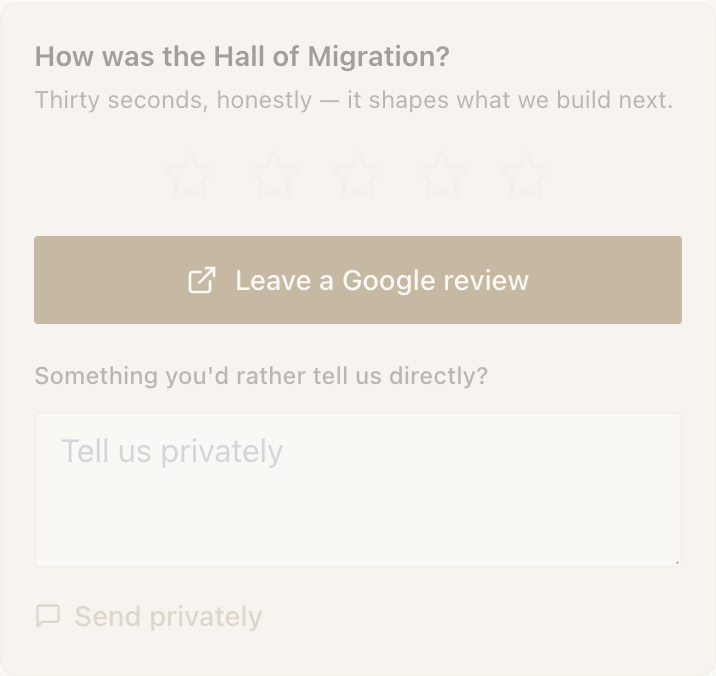
| Review & Feedback | Growth | A public Google review link plus a private feedback box. Both are shown to everyone. |
| Lead Capture | Starter | Contact details, with an optional file delivered in return. Use it when the point is to reach them later, not to measure anything. |
| Feedback Form | Free | An embedded Google Form. Answers land in your Google account, not in Audience, and the frame cannot report interactions back, so it counts as a view only. |
Choosing a rating type
| Type | Ask it when | Default notify threshold |
|---|---|---|
| Stars 1 to 5 | You want to know how one specific thing went. | 3 stars or below |
| Thumbs | The answer is genuinely binary and the question is small. | Thumbs down |
| NPS 0 to 10 | You want a number you can track across months and locations. | 6 or below |
Build it
- 1
Add a Rating block at the bottom of the right Experience
It is in the Questions & answers group of the block picker.
- 2
Pick the rating type
Stars (1-5), Thumbs up/down or NPS (0-10).
- 3
Write the prompt
Replace the default How was your experience? with something about the actual thing. Naming it lifts response.
- 4
Write the comment placeholder as an invitation
The field cannot be hidden, so make it read as optional. The button below it reads Select a rating until they choose, then Save.
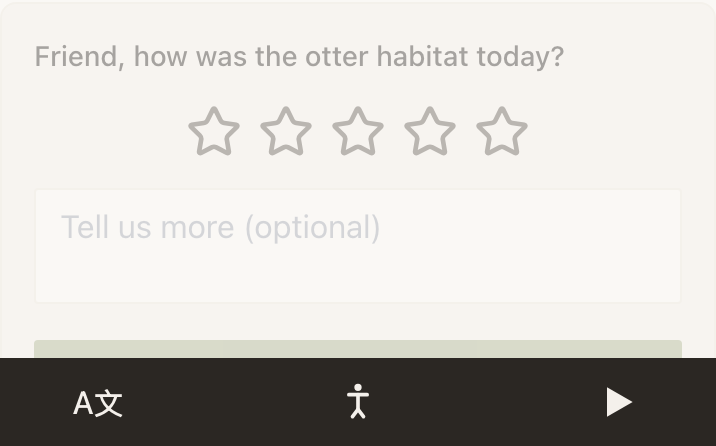
The prompt names the thing being rated and uses the visitor's name where there is one. The placeholder does the work of saying the box is optional. - 5
Open When someone answers and switch on Notify me
Then set Notify me about to Only low scores. A rating you hear about is one you can still do something about; being told about every five-star is how people learn to swipe your notifications away.
- 6
For a seat that turns over, allow repeats
Switch on Let visitors answer again, then Start blank each visit. See the next section.
- 7
Publish and tap the Marker yourself
Answer it once from your own phone and check the notification arrives before you rely on it.
The table that turns over
By default a block locks after one answer. That is right for a hotel room, where the same guest stays a week, and wrong for a restaurant table, where the next party would otherwise open the page and find the last party's rating sitting there.
Let visitors answer again unlocks it. [Start blank each visit](/support/memory/start-blank-each-visit), nested underneath, makes the block open empty on every page load instead of showing the last answer. Nothing is lost: every answer is kept, and repeat answers append rather than overwrite, so the visitor sees the newest and you keep them all.
What to do with the answers
- Notifications are the same-day channel. Only low scores, going to the phone of whoever can actually walk over to the table.
- The Experience's report carries the average, a histogram, and the most recent ratings, plus a From visit to answer funnel showing how many of the people who opened the page did anything at all.
- Audience → Timeline is every answer in order with the Experience that captured it, and Top questions on Overview tells you which of your questions is carrying the load.
- The answers CSV is emailed to your account address from Audience, built from exactly the rows on screen, filters and masking included.
There is a number the product will hand you unasked. In the Experience table, any page with ten or more views and under a 5% response rate is flagged with a warning, and the best response rate among pages with at least five views gets a badge. Treat 5% as the floor: below it, the question is in the wrong place or asking for too much, and no amount of rewording the prompt will fix a rating that sits above the menu.
If you are not on Growth
Rating, Quick Choice and Review & Feedback are all Growth blocks. A free account can use them while it builds and through the 14-day trial; after that, they need Growth. On Starter, the honest version is a Lead Capture with a single prompt, which gives you a way to reach the person but not a number to chart. On Free after the trial, the Feedback Form block embeds a Google Form. The answers go to your Google account rather than into Audience, and because it runs in a frame from another site, your stats can only count the view.
Example
Marigold & Vine
Marigold & Vine is a twenty-two-table farm-to-table restaurant with a Marker on every table tent. The table Experience is the menu: an Accordion for each course, a Text block on where the week's produce came from, and an Hours block at the bottom.
Under all of it sits one Rating block. Stars, prompt How was dinner?, and a comment placeholder that reads Anything you'd like us to know? (optional). Let visitors answer again and Start blank each visit are both on, because the table turns three times a night.
Notify me about is set to Only low scores, at 3 stars or below, and the notification goes to the phone the floor manager carries. In a normal week 300 taps produce 41 ratings, about 14%, comfortably above the 5% flag, and roughly two of those arrive while the party is still in the building.
The first version of the placeholder read Tell us what went wrong, and response sat at 4% with the warning triangle on the Experience table. Nothing else changed but those six words.
Can a visitor change a rating they already gave?
Yes. Every answer block carries a quiet Undo affordance that reopens it prefilled, without touching what was stored, and a Clear that genuinely erases the value. With repeats allowed they also get an Answer again link.
Why did a visitor's tap do nothing?
Almost always consent. A visitor who has not allowed personalisation cannot store an answer, so tapping a rating raises the Allow cookies to continue prompt instead of silently failing. Once they accept, the block works normally.
Can I see who left a one-star rating?
You can see the visitor's timeline and any name or contact detail they chose to give elsewhere in your space. If they gave you nothing, there is nothing to see. Memory holds what a visitor told you, and nothing bought from anywhere else.
Should I ask the same question on every Marker?
No. Answers to the same question from twenty Markers are one number split twenty ways, and each one is too thin to act on. Ask once, near the exit, and use the per-Experience view counts to tell you where people actually went.
Every answer, from every block, in one place, with the Marker that captured it.
Open Audience