There are three money blocks: the Donate Action, the Pay Action, and the older inline Donation block. They are one machine wearing three hats: the same checkout, the same connected account, the same fee. Connect Stripe once and all three start working.
Connecting Stripe
- 1
Open Account
Scroll to the Donations section.
- 2
Press Connect Stripe
Stripe's own onboarding opens. In the iOS app it opens in a browser sheet and returns you to the same page.
- 3
Finish Stripe's onboarding
Business details, a bank account, identity verification. This is Stripe's process, not NearField's, and how long it takes depends on your country and business type.
- 4
Check the section says Connected
It shows Connected to Stripe with the last characters of your account id. If it still shows a warning, Stripe has not finished with you yet: press Finish setting up Stripe.
There is no per-block and no per-Action connection. One account, one setting, every money block on your account.
How the money moves
- The charge is created on your Stripe account, not ours. Funds settle to you on your normal Stripe payout schedule.
- You pay Stripe's processing fee directly to Stripe. NearField does not bill it to you and does not mark it up.
- Refunds and disputes debit your balance and stay between you and your customer. NearField is not in the middle of them.
- NearField takes a flat platform fee: 5%, or 3% on Enterprise. There is no monthly fee to switch payments on, and both blocks are on the free plan.
What a visitor sees
A heading, an optional description, then a row of suggested amounts. Other amount reveals a numeric field. Pay can instead be a single fixed price with no picker at all. If you switched on Ask for a reference, they type a room number, a table or an invoice number, and it rides along so you can reconcile.
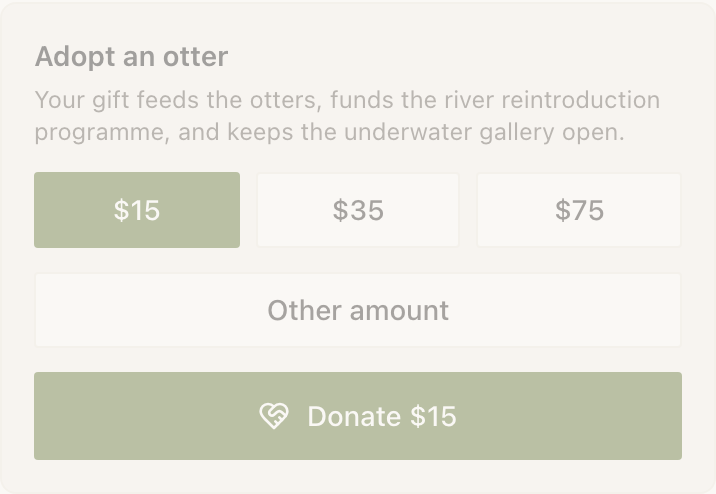
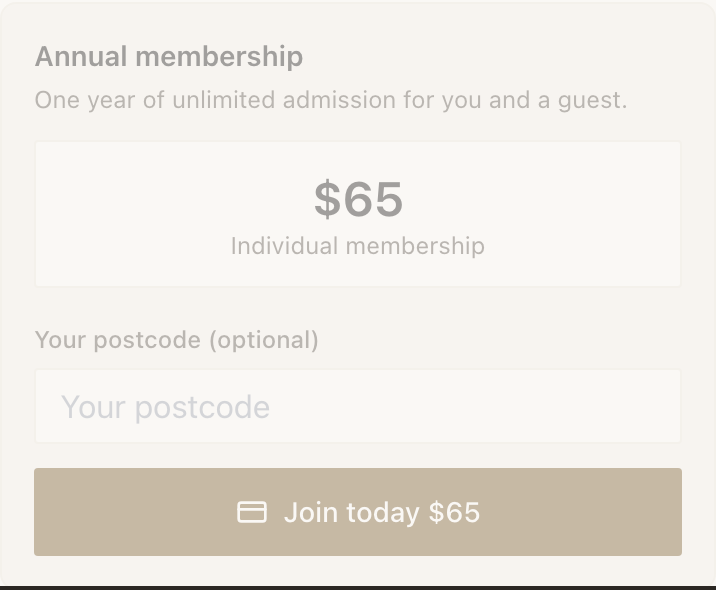
The button reads with the amount in it (Donate $25, Pay $10) then the page redirects to Stripe Checkout in the same tab. Same tab matters: a new tab loses the return trip on a phone that arrived by tapping a Marker.
After paying they land on a thank-you page confirming the amount, showing your thank-you copy, and telling them Stripe will email a receipt. If they navigate back to your Experience, the block shows a summary: a filled heart, the amount, and a Donate again link. A failed payment says plainly that they were not charged and offers a retry.
Supported currencies are US dollars, euros, pounds sterling, Canadian dollars and Australian dollars.
When the button says not connected yet
NearField keeps a stored copy of whether Stripe says your account can accept charges. It is refreshed when you open Account and when Stripe tells us your account changed. It is a cache, which means it can be behind reality for a short while.
| What you see | What it usually means | What to do |
|---|---|---|
| Connect Stripe | No Stripe account is linked at all. | Connect one. |
| A warning that Stripe is not fully set up | The account exists but Stripe has not cleared it to take charges. | Press Finish setting up Stripe and complete what Stripe asks for. |
| Still not connected after finishing onboarding | The stored copy has not caught up. | Open Account again. Loading the page re-checks with Stripe and updates it. |
| Payments not connected yet on a live block | The same stored value, read by the public page. | Fix it in Account, then reload the Experience. |
Payments and the iOS app
Inside the NearField app the money blocks render as an inert card explaining that payments are available on the published page. That is an App Store requirement, not a NearField choice. Visitors who tap your Marker see the live form as normal: the restriction applies only to previewing inside the app.
Example
Cedar Hollow Zoo & Aquarium and The Bellhaven Hotel
Cedar Hollow puts a Donate Action on the Marker beside the otter habitat, with suggested amounts of $10, $25 and $50 and a thank-you line naming the conservation fund. No reference field: a donation does not need reconciling.
The Bellhaven puts a Pay Action on the poolside Marker for a $15 day pass. Fixed price, no custom amount, and Ask for a reference switched on with the label Room number and Required on, so the front desk can match every charge to a room.
Does NearField ever hold my money?
No. Charges are created on your own Stripe account and settle to you. NearField's balance only ever receives the platform fee.
Can I take payments without a Stripe account?
No. Stripe is how the money moves, and the account has to be yours so that refunds, disputes and payouts belong to you.
What happens to my live blocks if I disconnect Stripe?
They keep rendering and stop accepting payments until you reconnect. The confirmation dialog says exactly that before you go ahead.
Do I need a paid plan to take donations?
No. Donate and Pay are free-plan blocks. Enterprise lowers the platform fee from 5% to 3%.
Connect your Stripe account and every money block on your account starts working.
Open Account settings