There are three places a completed Action shows up, and one channel most people assume exists and does not. Read the last section before you rely on this for anything time-critical.
The three real channels
| Channel | What arrives | How fast | Where |
|---|---|---|---|
| Push to the NearField app | The block name and what the visitor entered. | Immediate. | Every phone you are signed in on. |
| Email (Request set to Straight to me) | The request, with the room or table number in it. | Immediate. | Your account email address. |
| Email (leads) | A copy of each lead from Lead Capture, or from a Name, Email or Phone Capture block with notifications on, with every field they entered. | Immediate. | Your account email address. |
| Audience | A row per answer and per lead, attached to a visitor profile and the Marker that captured it. | Within seconds. | Audience, tabs Overview, Timeline and People. |
| Stats | Taps, completions, fallbacks, gated attempts and a conversion rate per Action. | Within seconds. | Stats, the Action performance card. |
Push to the NearField app
This is the channel that reaches you the moment anything lands. Leads and Requests set to Straight to me are also emailed to your account address just as fast. A push needs the NearField app installed on your phone and signed in: it has nowhere to go otherwise.
- 1
Open the block in the builder
Any block that captures an answer has a When someone answers panel below its own settings.
- 2
Switch on Notify me
The hint reads Sends a push to the NearField app on your phone. On Lead Capture this appears inside the editor instead, as Send to the NearField app, and also emails you a copy of each lead, as Name, Email and Phone Capture do. A Request block asks How should requests reach you?, and Straight to me always notifies, with no separate switch.
- 3
For a Rating, choose when
Notify me about offers Every rating or Only low scores. A rating you hear about is one you can still do something about; being told about every five-star is how people learn to ignore notifications.
- 4
Manage the rest in Account
Account → Notifications has the master switch and a per-Experience mute list, so you can turn one off without turning them all off.
Fourteen block types can notify, including Lead Capture, Waiver, Request, Review & Feedback, Rating, Quick Choice, Custom Input, Check-In, Geo Check-In, Passport, Quiz and the three contact-capture blocks.
Audience
Every answer and every lead lands in Audience as a row against a visitor profile, with the Experience and the Marker that captured it. The Timeline tab reads it as a day-by-day feed. The People tab reads it as contacts, filterable by whether you have an email, a phone number or a name.
The Overview tab narrates it in plain English: someone left their details at Ridgewood membership desk, someone signed your waiver, someone tried to claim your offer again. Contact details are masked by default: the Show contact details in full switch reveals them, and it is off until you turn it on.
Stats
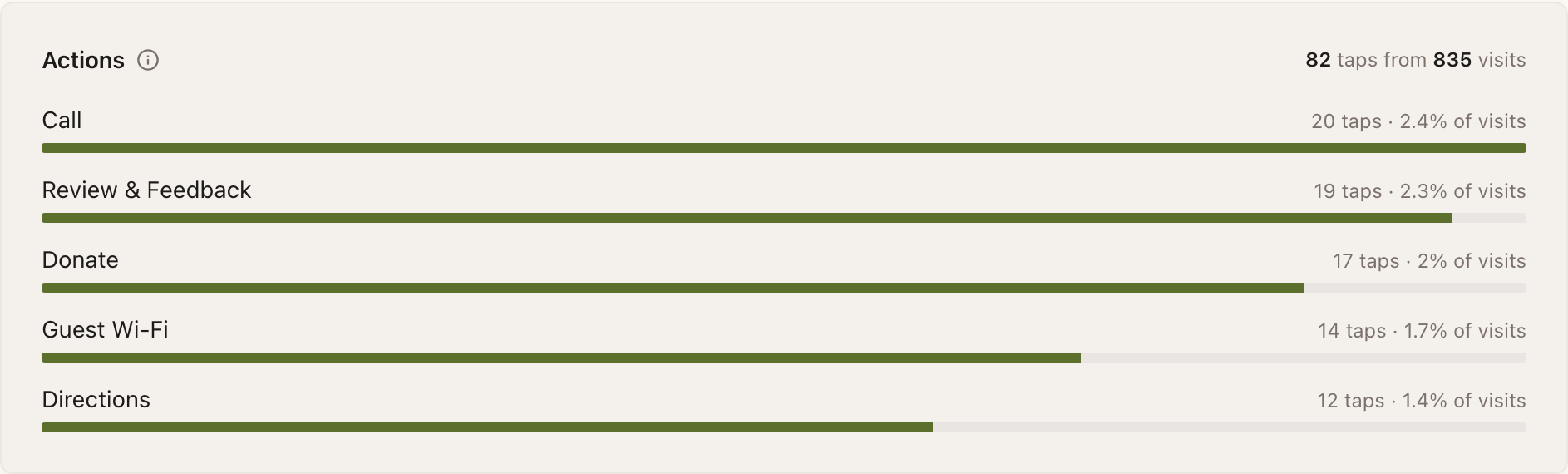
The Action performance card counts four things per Action, and the gaps between them are the interesting part.
- Taps: the visitor engaged with the block.
- Completions: the outcome finished.
- Fallbacks: something did not work as intended, most often a clipboard permission denied inside an in-app browser.
- Gated: a repeat visitor was turned away by a one-per-person rule.
For Donate and Pay, taps and completions come from different places on purpose: your page can only ever record that checkout was opened, and the completion is confirmed by Stripe. The gap between the two is your Stripe Checkout drop-off, which is a genuinely useful number.
What NearField does not send
Two settings read as though they contradict that, and both are worth understanding precisely.
- Lead Capture → Send it by (Email / Text / Both)
- This delivers your file to the visitor. It is the email me the brochure trade. Nothing about it goes to you: your copy of the lead comes from Send to the NearField app.
- Request → Visitor texts me / Visitor emails me
- These build a message and open the visitor's own messaging or mail app with the request already written. It reaches you only if they press send, and you have no way of knowing when they do not. Straight to me is the option that does not depend on a stranger finishing a text: the request reaches the NearField app and your email the moment they tap.
What does arrive by email is the weekly audience digest, which says what happened in your space without anyone opening NearField, and the shareable live stats report: a link a board member, an owner or a sponsor can open with no account.
Example
The Bellhaven Hotel: making room-service requests reliable
The nightstand Marker carries a Request block with Towels, Housekeeping and Late checkout, and asks for a room number. It used to be set to Visitor texts me, to the front-desk mobile.
That meant a request arrived only when the guest completed the text. Switching to Straight to me fixed it: the request reaches the duty supervisor's NearField app and the front-desk email the moment the guest taps, room number included, with nothing left for the guest to send.
Can I forward leads to my CRM?
Not directly today. Audience exports both a contacts CSV and an answers CSV, which is the current path into another system.
Why did a lead notify me once when the form collected three fields?
On purpose. A lead notifies once, from the endpoint that handled the whole submission, carrying everything the visitor entered. Notifying per field would send you a push with whichever value happened to land first, usually the name, never the email.
I got a notification saying someone tried to claim an offer again. What happened?
A Lead Capture block with One submission per person switched on matched a repeat visitor. They saw your message for repeat visitors and the file was not sent a second time. The submission still appears in Audience.
Nothing is arriving on my phone.
Check three things in order: the NearField app is installed and signed in on that phone, Account → Notifications has push on and the Experience is not muted, and the block itself has Notify me switched on.