Open Audience and the subtitle sets the scope: what your visitors are telling you, across every Experience. One period picker sits above three tabs (Overview, Timeline, People) and governs all three, so the people you are counting always belong to the range on screen. It is the same remembered period as Stats. This article is about the third tab, and about who qualifies to be on it at all.
Who is on the list
A visitor gets a profile when they open one of your Experiences and Functional consent is in place. From then on, everything they tell you attaches to that profile, on that device, or across devices once they verify a phone number.
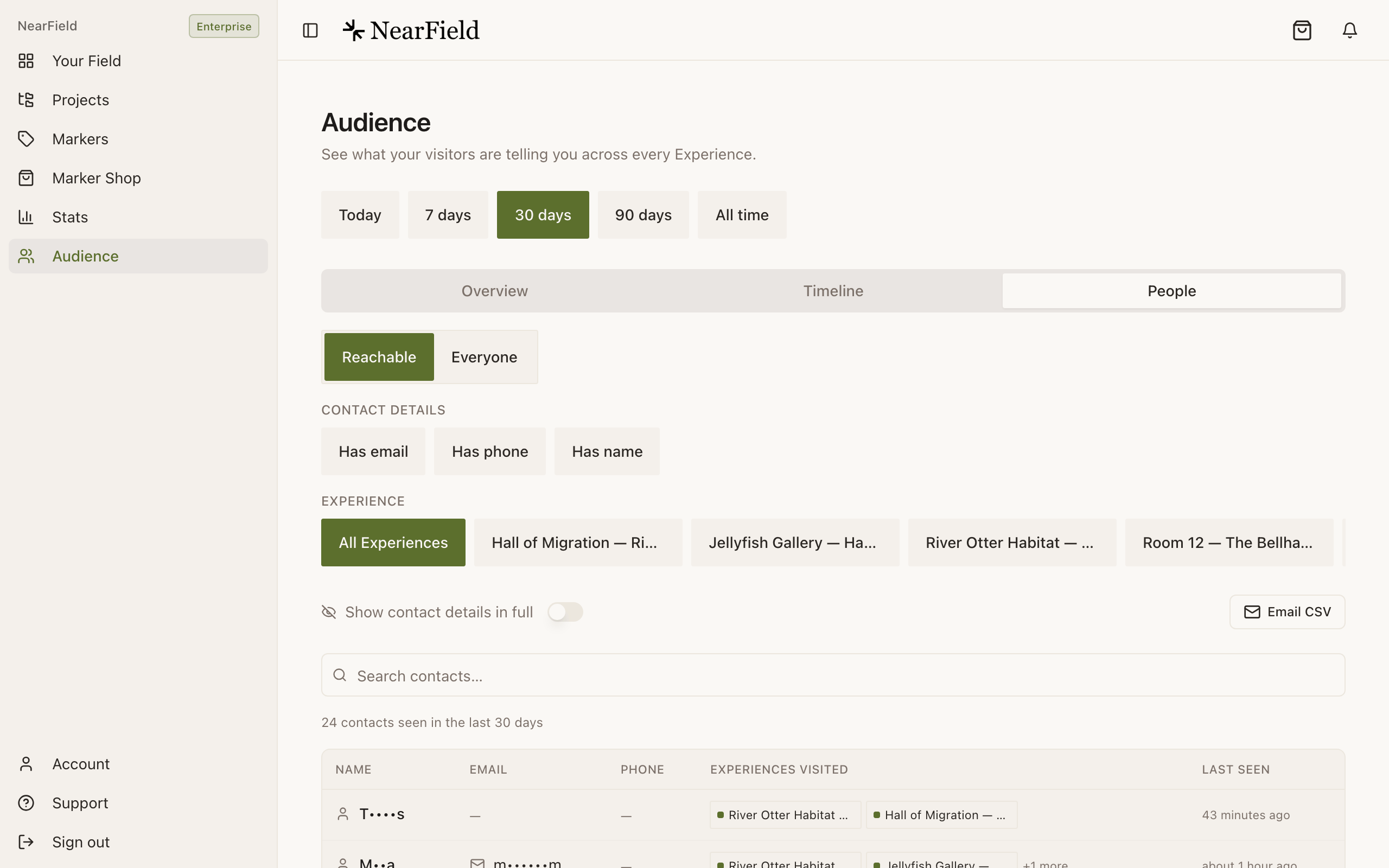
The People tab has two views, and the difference matters more than the names suggest.
- Reachable
- People you could actually contact, seen in the period. A profile qualifies with at least one of a name, an email address or a phone number. Filter by Has email, Has phone and Has name, narrow by Experience, and search across all three.
- Everyone
- Everyone you met in the period, including anonymous regulars who have never given a detail: anyone seen in the range, plus anyone with something on their timeline in it, such as an answer or an Action. These are the same people Who you've met counts on Overview, and its four groups sit on top as filters. Growth and above. Below that, the switch shows a lock and opens the upgrade panel.
Who you've met
Who you've met splits everyone you met in the period into four groups, on Overview and at the top of Everyone. Each person sits in exactly one group, checked in order, so someone who has visited ten times and told you their name is Named, not a regular. Its ⓘ puts it this way: "Everyone you met in the period, in one group each, checked in this order: Named (told you a name, email or phone), Regulars (visited 3 or more times), Engaged (answered or took an Action), then Passers-by."
| Group | Definition | What it is for |
|---|---|---|
| Named | Told you their name, email or phone number. | The list you can follow up |
| Regulars | Have visited 3 or more times. | People who keep coming back without saying who they are: the ones most worth asking |
| Engaged | Answered a question or took an Action, without saying who they are. | Willing to take part, not yet willing to identify. Ask for less, or ask later |
| Passers-by | Visited, but haven't answered anything or taken an Action. | Normal, and usually the biggest group. A shrinking share here is the real sign a page is improving |
Engaged means the same thing everywhere in NearField: answered a question or took an Action.
What the Overview tab adds
Overview opens with a sentence ("You've met 26 people in the last 30 days.") and four tiles. Each has an ⓘ, and these are its words:
- People met
- "Visitors we can recognise when they come back on the same phone, counted once each. Someone counts in a period if they visited during it." Underneath, how many of them have visited more than once.
- Known by name
- "People who told you their name, out of the people you met in the period."
- Contactable
- "People who left an email address or a phone number. Someone who left both counts once." Underneath, the people it is out of, and how many verified a phone once anyone has.
- Answers
- The same tile as Stats, counted the same way, with how many people gave them underneath.
- What your visitors are telling you: the same ranked cards as Stats, about people and answers rather than reach.
- Contact details left: email addresses, phone numbers and names, with the number of people who left them at the top, because one person can leave more than one. Each row opens People already filtered to it.
- Who you've met: the four groups as one bar. From Growth, tapping a group opens Everyone filtered to it.
- Latest on the timeline: the newest moments in plain English, from Growth. On Starter the card is Recent activity: two real rows and a blurred preview.
- Answers over time: the same chart as Stats, answers only.
- Top questions: your ten most answered questions in the period. On Growth, tap one to see how people answered.
- By Project: each Project's answers and the people who gave them, "50 answers from 24 people", with how many of those people answered each question. Experiences that are not in a Project are flagged underneath, with a link to assign them.
Getting the list out
- 1
Open People on Reachable
Reachable is the list with an export. Everyone is for reading, not exporting: it has no Email CSV.
- 2
Filter to what you actually want
The period above the tabs, the Contact details pills, the Experience picker and the search box all narrow the table. The export follows the table exactly.
- 3
Decide about masking
Show contact details in full controls what you see. The contacts CSV always exports raw values regardless, so treat the file as sensitive.
- 4
Press Email CSV
The file is emailed to your account address rather than downloaded, because a download inside the iOS app lands somewhere you cannot get to it. The toast tells you which address it went to.
The contacts file carries name, email, phone, Experiences visited, first seen, last seen, total visits and the visitor token. The answers file, exported from Timeline, carries timestamp, Experience, question, answer and visitor.
Example
Marigold & Vine, turning a table card into a list
The restaurant runs one Marker per table pointing at a menu Experience with a rating block and an email capture offering the chef's Sunday note. After a month: 640 people met, 88 known by name, 71 contactable.
The Sunday-note list is the 71, on Reachable with Has email on. The more useful number is on Everyone, under Regulars: 15 people who have been back three times or more and have never said who they are. Anyone who shares a name moves to Named, so those 15 are exactly the regulars the page has not yet asked well, and the reason the email capture block moves above the fold.
Can I email people from inside NearField?
No. NearField collects the list and exports it; sending is up to whatever you already use. The only email NearField sends on your behalf is the file delivery from a Lead Capture Action.
Someone asked to be removed. What do I do?
Find them in People, open their drawer and use Forget this visitor. That deletes the profile and its whole history permanently.
Why does one person appear twice?
A profile follows a device until a phone number is verified. Two devices are two profiles until then. Verifying merges them, and everything from before the merge comes with.
People met says 22 visited more than once, but Regulars says 1. Which is right?
Both. They answer different questions. The line under People met counts everyone who has visited more than once, so two visits are enough. Regulars needs three visits or more, and it only holds people who have not told you who they are; anyone who has is counted under Named instead.
How far back does the list go?
As far as the period you pick. On Starter, Overview and Timeline stop at the last seven days, and Timeline shows the latest 50 answers; People (the Reachable list and its CSV) offers every period. Growth and above see all of it.
See who your Experiences have met.
Open Audience