Find it at Audience → Timeline. It is available from Starter upwards. On Free the whole Audience page is replaced by an upgrade card, except during the 14-day trial, when it shows what Growth shows.
Two logs, and which one you are looking at
NearField keeps two separate records of what happens on a page, and almost every "why do these numbers disagree" question comes down to which one a surface is reading.
| Aggregate events | Visitor events | |
|---|---|---|
| Written for | Everybody who opens the page | Only visitors who have a profile |
| Needs consent | No | Yes, Functional consent |
| Holds | Action taps, block interactions, Inclusion Bar use | Names, answers, phone verifications, Action taps, block interactions, donations |
| Read by | The Actions tile and the Actions card on Stats and each Experience report, the Inclusion Bar cards, and the Actions count in the Audience sentence | The Timeline, the moments feed, People, the visitor drawer, and the What people told you section of an Experience report |
What the timeline is allowed to show
The timeline reads a fixed set of visitor event types. Anything outside that set is stored but is not part of a visitor's story:
- Name captured: someone told you who they are.
- Answer captured: a rating, a choice, a check-in, a passport stamp, free text.
- Phone verified: a visitor confirmed a phone number with a one-time code.
- Action fired: a tap on Wi-Fi, Call, Directions, Lead Capture and the rest.
- Block interaction: a gallery browsed, audio played, a section opened, a sponsor tapped.
- Donation started, succeeded and failed: the three states of a payment, which is how a checkout drop-off becomes visible.
Only the first two count as answers. An Action tap is engagement. Keeping them apart is what stops a visitor tapping Call us from reading as though they answered a survey question.
Filtering it down
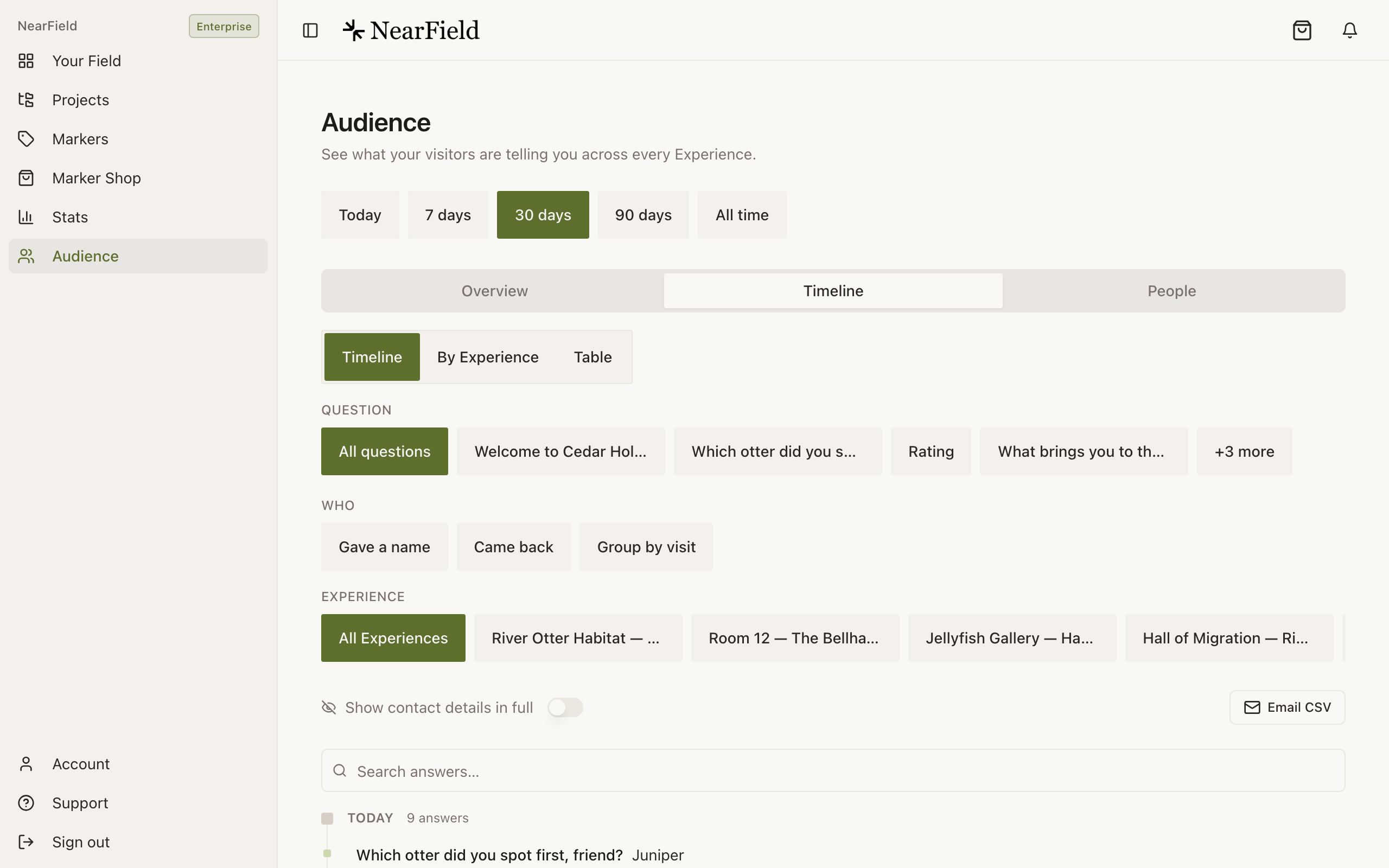
The period is set once, above the three tabs, and it is the same remembered period as Stats. Under the tabs the controls stack in the order you would ask the questions: how to view the list, which question, who, which Experience, then privacy and export, with the search box last, against the list it narrows. On a phone everything after the view switch sits behind one Filters button, which says how many are on ("Filters (2)") and opens a sheet with Show results at the foot.
- 1
Pick a period
Growth and above get every period, starting on 30 days. On Starter, Overview and Timeline stop at the last seven days, and Timeline shows the latest 50 answers.
- 2
Choose a view
Timeline is the day-by-day spine. By Experience groups the same rows into a card per Experience. Table is the flat grid: when, Experience, question, answer, visitor.
- 3
Narrow to one question
The Question picker lists the questions that actually have answers, not the blocks you have defined, so a choice can never lead to an empty list.
- 4
Add the people filters
Under Who, Gave a name and Came back narrow to visitors worth following up. Group by visit collapses one person's answers on one page into a single row. Growth and above.
- 5
Export what is on screen
Email CSV sends the rows you are looking at, filters and masking included, to your account email address rather than downloading a file that a phone would bury.
One visitor's whole story
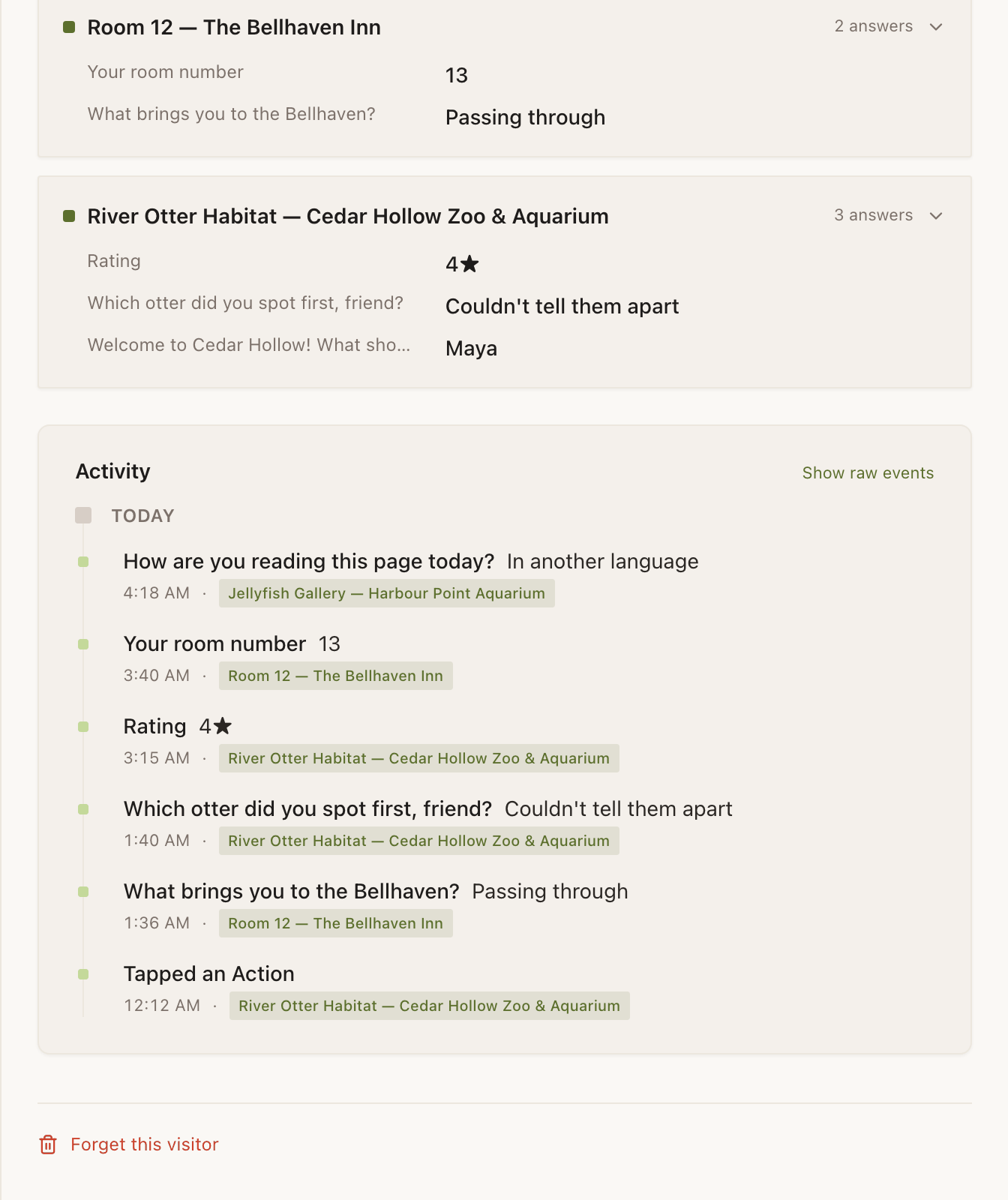
Tapping any row opens that visitor's drawer: what you know about them, how many visits and answers they have, a Memory card per Experience with their question-and-answer pairs, and their own activity timeline. The drawer reads that person's whole history, whatever period is picked above it.
That timeline has two modes. Show meaningful events is the story: the same event types listed above, capped at 50. Show raw events is everything recorded against them, capped at 100, which is where you go when you are debugging rather than reading. First visit and Returned are labels the drawer adds itself; a return needs a gap of more than three days.
Example
The Bellhaven Hotel, one guest across three taps
A guest taps the Marker on the desk in room 214 and gives their name. That evening they tap the lobby Marker and ask for extra towels through a Request block. The next morning they rate the stay four stars from the same page.
The Timeline shows three rows across two days. Grouped by visit, it shows two. In their drawer it is one person, three answers, two Experiences, with Returned marking nothing, because all of it happened inside three days.
Stats says 40 Actions and my timeline shows 12. Which is right?
Both. Forty people tapped; twelve of them had a visitor profile. The tile counts everybody, the timeline can only show the ones with a profile.
Why is a visitor called something like v_3k9fp2a1?
That is their token: the anonymous handle for a device that has not told you a name. Once a Name Capture, Email Capture or Lead Capture block gets an answer, the row starts showing the name instead.
Can I delete one person's history?
Yes. Open their drawer and use Forget this visitor. It permanently deletes the profile and every interaction attached to it, and cannot be undone.
Why does the search find nothing when I search a name?
The timeline search matches answer text only. To find a person, use the People tab, which searches names, emails and phone numbers.