The person who needs your numbers usually does not want a login. Share report turns the period you are looking at into a page they can open on a phone, on cellular, with no account and no app.
Creating the link
- 1
Open Stats and set the period
The report is minted around the range you are currently looking at, so pick it before you share.
- 2
Press Share report
Top right of Stats. It appears on Growth and above, and only once there is something worth sharing.
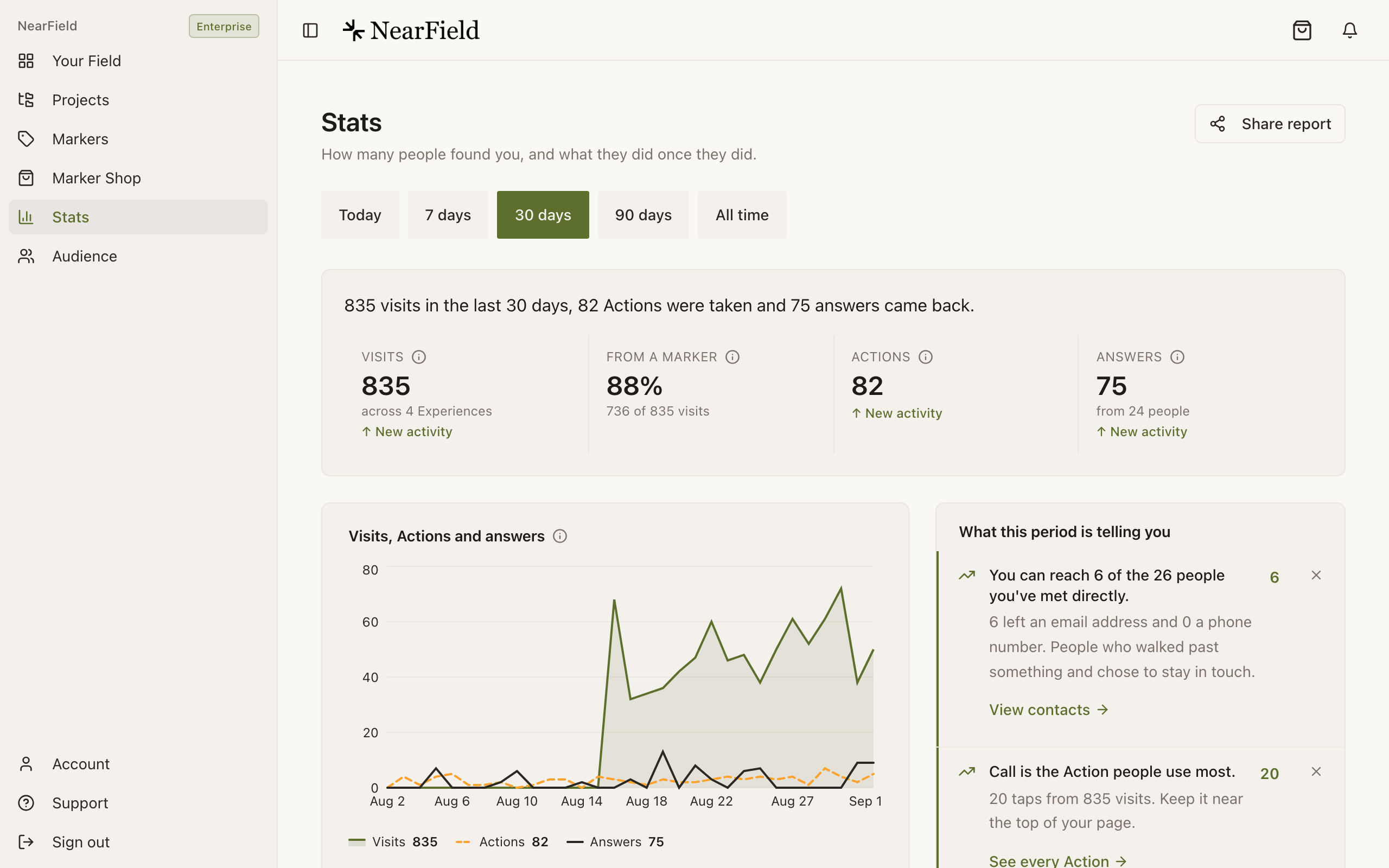
Share report mints its link around whichever period is selected below it. - 3
Copy the link
You get a URL of the form
/report/{token}and a toast confirming it is valid for 30 days. - 4
Send it
Email, a message, a slide: it is an ordinary link. Nothing needs installing at the other end.
The link stays live rather than freezing a snapshot, so the numbers move with the period. A monthly report sent on the first still reads correctly on the fifteenth.
What the report contains
- Your organisation name and logo, and the dates the report covers.
- Collected, when there is revenue in the period.
- A one-sentence summary of the period over the four tiles Stats opens with: Visits, From a Marker, Actions and Answers. Each is counted the way Stats counts it, so the report agrees with your Stats page for the same period.
- Visits, Actions and answers over the period, in the same colours as the Stats chart, drawn without a charting library so it loads on a bad connection.
- How people arrived: the NFC tap, QR scan and link split, with Builder QR too when anyone scanned one, and a line saying what each counts.
- Top Experiences, by name.
It contains counts and Experience names. It contains nothing that identifies a visitor: no names, no email addresses, no individual answers, no timeline.
How to treat the link
Two practical consequences. First, Top Experiences prints your Experience names, so an internal name like "Bellhaven (staff only, room 214 test)" will be read by whoever opens the report. Rename before you share. Second, the link expires after 30 days on its own; if a report needs to stop working sooner than that, the reliable answer today is not to have sent it widely in the first place.
Example
Harbour Point Aquarium, the quarterly sponsor update
The aquarium's touch-pool Marker is sponsored. Each quarter the sponsor wants proof of reach, and has no interest in a NearField login.
The team sets the range to 90 days, mints a report and pastes the link into their quarterly email. The sponsor sees visits, how people arrived and which Experiences carried the traffic, and cannot see a single visitor's name, because the report has no access to any.
Does the recipient need a NearField account?
No. That is the whole point of the report: it opens in any browser with no sign-in.
Can they see my Audience or my contacts?
No. The report is built from a separate, count-only view of your data. There is no path from it to visitor names, answers or contact details.
What happens after 30 days?
The page reads "Report unavailable" above "This report link is invalid or has expired." Mint a fresh one when the next report is due.
Can I share one Experience rather than everything?
Not today. The report is account-level for the chosen period. For a single Experience, the practical option is a screenshot of its report page.