NearField is built for places that are already careful about their visitors: museums, aquariums, hotels, schools bringing groups. The short version: nothing is bought, nothing follows a visitor off your property, and anything a visitor gave you can be deleted by either of you.
What is actually stored
- On the visitor's phone
- One random 24-character token in their browser's local storage, under a key namespaced to your account. It is not a name and it is not linked to a device identifier. That is the entire footprint on their side.
- On NearField's servers
- A visitor profile against that token: the answers they gave, how many times they have visited, which of your Experiences they have seen, when they were first and last seen, and a timeline of what they did. Nothing else.
- Only if they gave it
- A name, an email address or a phone number, from a block that asked for one. A visitor who never answered a capture block has none of these on their record.
- Only on Growth, and only if they chose to
- A verified phone number, if the visitor completed a one-time code. This is what lets their profile survive a cleared browser or a new phone.
How far it reaches
The outer boundary is one NearField account. A visitor's token is namespaced to your account, so a different NearField customer's Markers mint a completely separate token on the same phone. Two customers cannot see each other's visitors, and there is no shared pool that either of them draws on.
- NearField does not buy visitor data. Nothing on a visitor record came from anywhere except your own space.
- There is no third-party file to enrich a record with, and no option to add one.
- Inside your account, each answer additionally carries its own reach: This Experience, This Project, or Everywhere.
What a visitor can see and clear, themselves
Every published Experience carries the Inclusion Bar. Its accessibility menu holds two controls that matter here, and a visitor needs nothing from you to use either.
- Cookie settings
- Review what's stored on this device. Opens the consent panel, where they can change what they allowed earlier.
- Forget me
- Delete your visitor profile from this device. This is a real deletion, not a local reset: their profile, their whole event timeline, and any phone verification are deleted on our servers, and then the token is cleared from their phone. They become a person NearField has never met.
On any block with Show them their history switched on, a visitor can also open Your answers and read back everything they told that block, with times.
What you can see and clear
Audience is where a visitor's record lives on your side. Three things about it are worth knowing before you show it to anyone.
- 1
Contact details are masked by default
Emails, phone numbers and names render partly hidden until you turn on Show contact details in full. The switch is off until someone turns it on, and it applies everywhere at once.
- 2
Any record can be deleted
Open the visitor's profile and use Forget this visitor. The confirmation says it plainly: this permanently deletes their profile and all interaction history. It cannot be undone.
- 3
You can export what you hold
A contacts export and an answers export, both CSV, so a subject access request is a download rather than a support ticket.
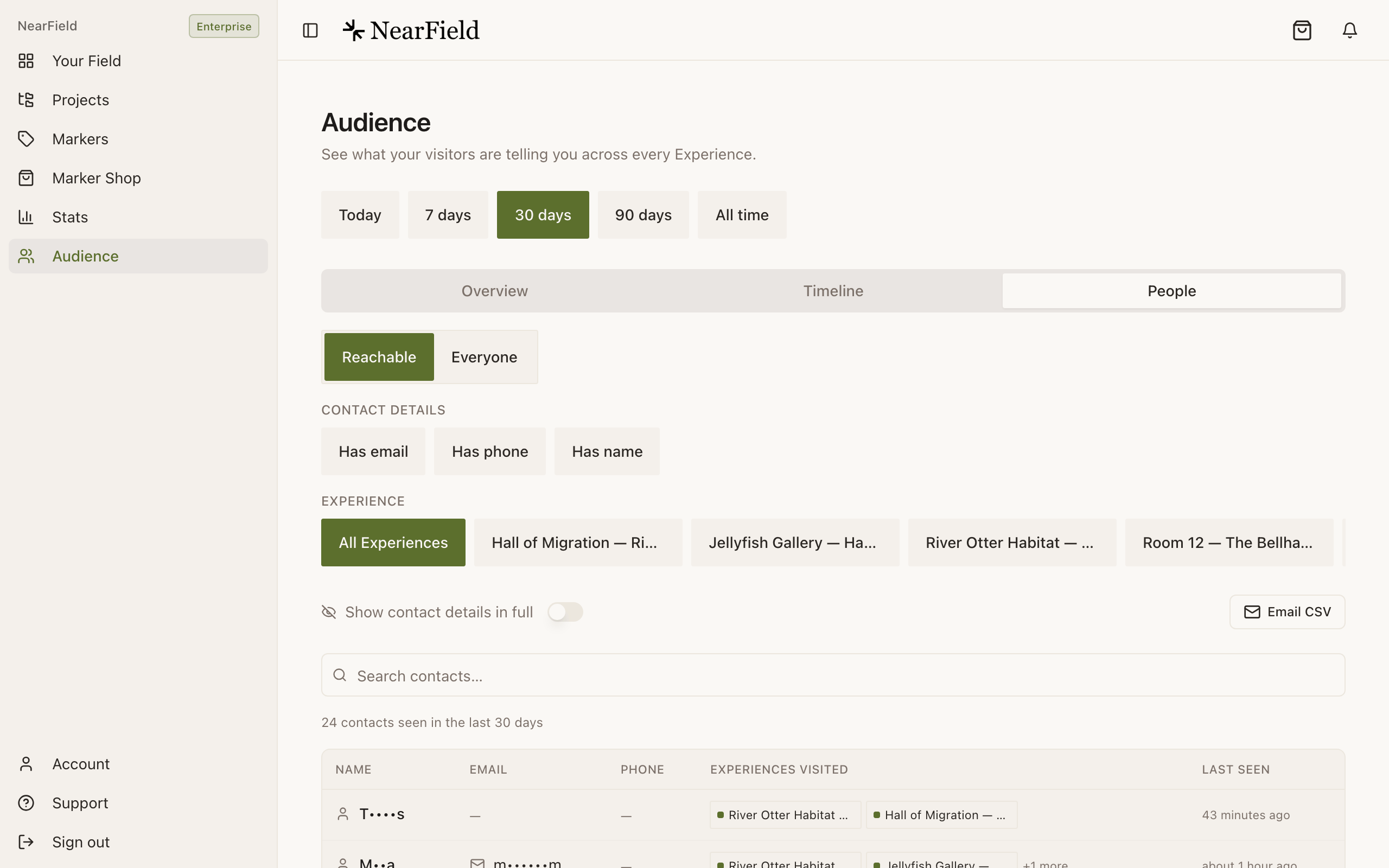
Masking is the default on every Audience surface. Email CSV sends the same list to your account address.
Text messages and consent
If you use Lead Capture to text a file to a visitor, NearField records the exact wording they agreed to, and honours a STOP reply on your behalf. If you leave the consent text blank on an SMS delivery, NearField writes one and records that. There is no configuration that texts someone without a stored agreement.
What to tell your visitors
Adapt this. It is accurate for a default NearField setup and short enough to sit on a Marker or in a footer.
Example
A paragraph you can borrow
When you tap one of our Markers, we store your answers on this device so the rest of our Markers can use them: your name, if you gave it, and anything you told us. It stays with us and is never shared with other venues. You can see what is stored, or delete all of it, from the accessibility button at the bottom of any of our pages.
Ridgewood Museum of Natural History puts that line in an Accordion block at the foot of every Experience, titled What we remember about your visit. It takes one block and settles the question before anyone has to ask it.
Is a visitor's data ever used to train anything?
No. Visitor answers are stored for your Audience and your Stats. They are not sold, not shared between accounts, and not used to enrich anyone else's records.
How long is a visitor profile kept?
Until it is deleted, by the visitor with Forget me, or by you with Forget this visitor. There is no automatic expiry you can configure today, so if your own policy requires one, put the deletion in your calendar.
What happens to a record if I delete my NearField account?
Deleting your account removes your profile, your Experiences, your brand settings and your audience data. The dialog makes you type DELETE to confirm, because it cannot be undone.
Does a visitor have to tell me anything to use an Experience?
No, and it is worth designing that way. An Experience with a Name Capture on it still works perfectly for someone who scrolls past it. Every greeting should have a fallback for exactly that person.