The Marker never changes
The code printed on a Marker and the address written into its chip are both the Marker's own address. They are set when the Marker is manufactured and they are never rewritten. When you relink, what changes is a single row in your account that says which Experience that address currently resolves to.
This is the whole argument for a Marker over a printed code. A printed code commits you to a destination at the moment of printing. A Marker commits you to nothing.
The life of a Marker
- 1
Ordered
Picked from the Shop and on its way. Ships from Tampa.
- 2
Registered
You enter the six-character PIN printed on the back. Now it is yours.
- 3
Linked
Pointed at one of your published Experiences.
- 4
Placed
Mounted where the question gets asked. Taps and scans start counting.
- 5
Relinked
Pointed somewhere new whenever you like. Same Marker, same wall, new content.
Step five is the one worth remembering. Nothing about the physical Marker changes when you relink it: the chip and the printed code still carry the same address they left the factory with. Only what that address points at moves.
Link a Marker
- 1
Open Markers and find the Marker.
Rows are labelled with the name you gave the Marker, or its Marker ID if you have not named it yet.
- 2
Open the row's actions menu.
It is a dropdown on a desktop and a bottom drawer on a phone, so it is reachable one-handed while you are standing in front of the wall.
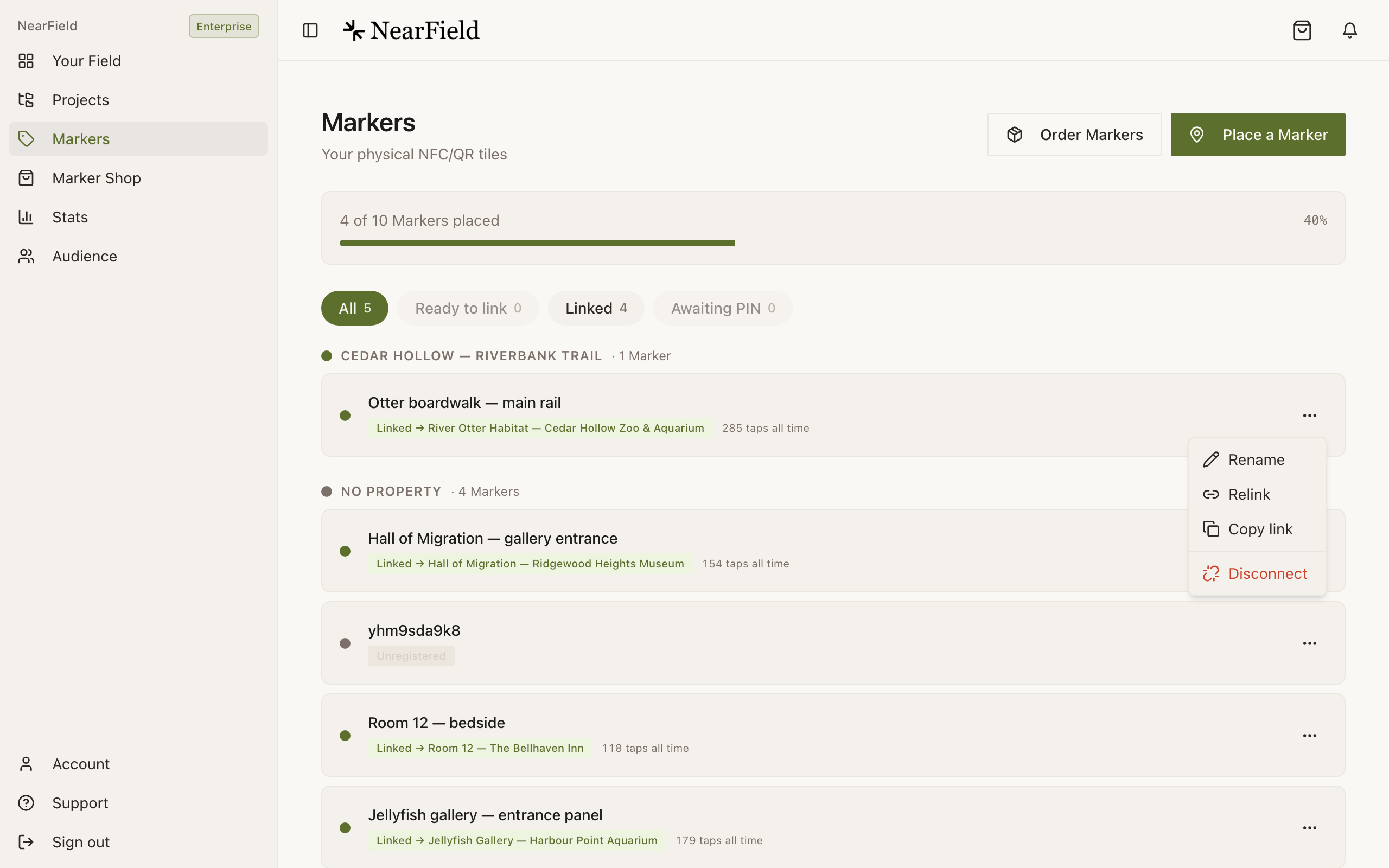
Relink is the second item, and it does both the first link and every one after it. - 3
Choose Relink.
The same item does the first link and every link after it. There is no separate connect step.
- 4
Select an Experience and save.
Redirect Experiences show a Redirect badge and their destination, so you do not have to remember which of your entries is a full page and which is a jump to somewhere else.
- 5
Tap the Marker to confirm.
The change is live the moment you save. There is no publish step for the Marker itself.
Relinking keeps the history
A Marker's lifetime figures are counted against the Marker, not against whatever it happens to be pointing at today. The row shows something like 47 taps all time · 3 Experiences, and clicking through to stats shows the whole run. Relinking has never wiped a Marker's numbers and never will.
Example
Marigold & Vine changes the table Markers
Marigold & Vine has a Marker on the edge of each of eighteen tables. From Monday to Thursday they point at the à la carte menu. On Friday morning the manager relinks all eighteen to the weekend brunch Experience, one row at a time, from the office. Nothing is reprinted, no table is touched, and the brunch Experience inherits eighteen Markers that already have a year of taps behind them.
Where else you can relink
- From the iOS app. Hold the phone against a Marker and the sheet offers Point this Marker somewhere else, along with the option to build a new Experience or set up an Action on the spot. See Scanning a Marker with the iOS app.
- From an order. While an order is still being prepared, Your Orders lets you plan a destination per Marker before the Markers have even shipped.
- From the publish flow. When you publish an Experience, NearField offers to connect a Marker to it. The shortcut and the Markers page work up to the same Marker allowance.
How many Markers can point at the same Experience?
As many as you like. An Experience does not know or care how many Markers resolve to it, which is what makes one Experience per room or one per habitat practical.
Is there a delay after I relink?
No. The lookup happens when the visitor opens the Marker, so the next tap gets the new destination. A visitor who is already looking at the old page keeps looking at it until they reload.
Can I point a Marker at a website instead of an Experience?
Yes, by way of a Redirect Experience: a one-line entry whose only job is to forward to a URL you already have. It still counts taps, so you keep the numbers.
What happens to the old Experience when I relink away from it?
Nothing. It keeps its content, its public link and its past views. It simply stops being what that Marker opens.