Both Actions live in the gap between I want something and someone knows about it. They close that gap in opposite directions: Book hands the visitor off to a system you already run, and Request brings the ask to you.
| Book | Request | |
|---|---|---|
| Plan | Enterprise | Growth |
| What it does | Opens your booking system in a new tab. | Sends the request, with the room or table number in it, to the NearField app and your email. |
| Who owns the outcome | Your booking provider. | Whoever watches the NearField app or your account inbox. |
| Reaches you if the visitor stops halfway | No, and nor does your booking system. | Yes with Straight to me, the default: it arrives the moment they tap. With Visitor texts me or Visitor emails me, only if they press send. |
| Good for | Classes, appointments, tables, tours. | Towels, valet, a refill, a test drive, a question at a desk. |
Book: handing off to your calendar
NearField does not run a calendar and does not want to. Book is a clean hand-off to the one you already keep: Calendly, Square, Mindbody, an OpenTable link, anything with a URL.
- 1
Add the Book block
It is in Visit info & one-tap help in the block picker, marked with a lightning bolt.
- 2
Paste your booking link
The Booking link field. If you leave off the
https://prefix, NearField adds it. - 3
Write the heading and the button
Heading defaults to Book a time and the button to Book now. Name the actual thing: Book a guided tour beats Book now on a wall.
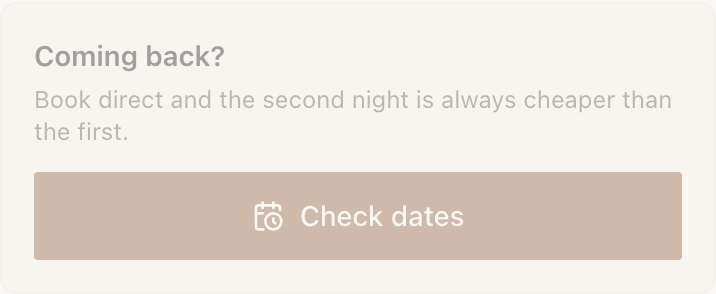
Neither the heading nor the button uses the default wording. Both say what this particular booking is for.
Book can sit behind phone verification on Growth and above, which turns a wall-mounted booking link into confirmed, reachable contacts in your Audience.
Request: routing a short ask to staff
Request is the concierge Action. The visitor picks one thing from a short list, optionally types a room or table number, and taps. By default it goes straight to you: Request: Towels (Room number: 412) arrives on the NearField app and in your email, and the visitor sees a confirmation.
Staff get a message with the request and the room already in it, not just hi. That is the whole value: the thing that makes a request actionable is the detail nobody wants to type.
- 1
Add the Request block
It sits in Questions & answers.
- 2
Choose how requests reach you
Straight to me (the default) sends each request to the NearField app and your account email. Visitor texts me and Visitor emails me open the visitor's own messaging or mail app instead, and ask for your number or address.
- 3
List what they can ask for
What can they ask for? takes a short list. Three to six options is right; a long list stops being one tap.
- 4
Decide about the reference
Ask for a room or table number is on by default, labelled Room number. Rename it for your space: Table, Berth, Locker.
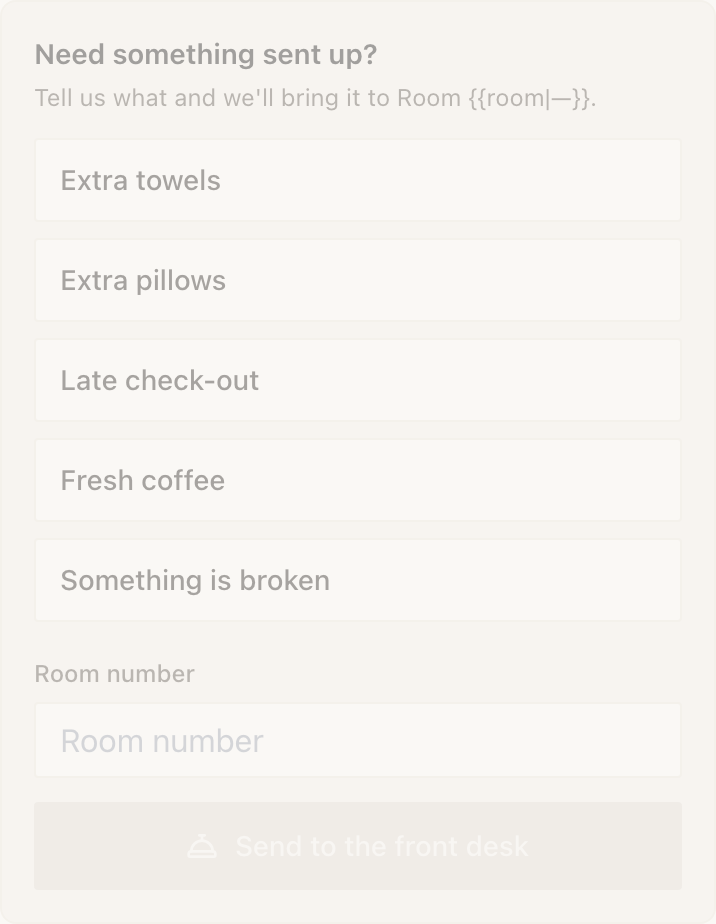
Five options, one reference field. The send button stays inactive until the visitor has picked something. - 5
Write the confirmation
With Straight to me, What they see after sending is the line the visitor reads once it has gone, such as Sent to the front desk.
Making a request actually reach you
Straight to me does not depend on that. It fires the moment the visitor taps, carries the choice and the reference, lands on every phone you are signed in on, and emails a copy to your account address. Pick a visitor option only when you want the reply thread: the message the visitor sends comes from their own number, so your night porter can text back. Those options can still push to your phone with Send to the NearField app.
Either way the choice is stored as an answer, so requests show up in Audience as sent a request and count in the Action performance card in Stats.
Example
The Bellhaven Hotel: the nightstand Marker
One Marker on the nightstand of every room, pointing at a room card Experience. Near the bottom sits a Request block headed What do you need?, with Towels, Extra pillows, Housekeeping, Late checkout and Something else.
How should requests reach you? is Straight to me. Ask for a room or table number is on, labelled Room number. The duty supervisor sees each ask on their phone, and the account's email address, which is the front desk's, gets a copy with the room number included, whether or not anyone has the app open.
The spa page on the same account uses Book instead, pointing at the existing treatment calendar. No list of options, no reference: the calendar already asks everything it needs.
Can Request send straight to my staff without involving the visitor's phone?
Yes, that is the default. Straight to me pushes each request to the NearField app and emails it to your account address. There is no SMS to the organisation.
Can I route different options to different people?
Not within one block. Straight to me always goes to your account, so route everything there and triage, or use two Request blocks set to Visitor texts me or Visitor emails me with different numbers or addresses (one for housekeeping, one for the desk).
Book shows a plan chip and will not add. Why?
Book needs Enterprise, and stays locked on every other plan and during the trial. Request needs Growth: a free account builds with it, but a paid plan below Growth shows the plan name instead of adding the block. Tapping a locked one opens your upgrade options. Nothing is added and nothing is charged.
Can I use a plain Button instead of Book?
Yes, and often you should. A Button opens the same URL for free. Reach for Book when you want the tap counted as an Action in Stats, or when you want phone verification in front of it.