Guide · Botanical gardens
Botanical Garden Interpretation Behind Every Plant Label
A plant label holds a name and an accession number. How to put the story, the season and the audio behind it, on a page you edit from your phone.
A plant label has room for a common name, a botanical name, a family, a native range and an accession number. But the visitor standing in front of a hundred-year-old magnolia wants to know who planted it, why it flowers before its leaves appear, and whether it will grow in their own yard. None of that fits on a label, and a panel for every specimen would crowd out the plants.
Gardens also change in a way galleries don't. The star bed in April is green foliage by July, the conservatory show rotates, and paths close after a storm. Printed panels can't keep up, and the "what's in bloom" whiteboard only helps people who read it on the way in.
What stays on the label, and what goes behind it
| Information | How often it changes | Where it belongs |
|---|---|---|
| Common and botanical name, family, native range | Never | The printed label |
| Accession number | Never | The printed label |
| The plant's story: origin, history, uses, why it matters | Rarely, but it needs room | A page behind the label |
| What it looks like in each season | Four times a year | Photos on that page |
| What's in bloom in this bed right now | Weekly in peak season | A status notice at the top of the page |
| Path closures, conservatory changes, event days | Whenever they happen | A status notice on the garden-wide page |
How a page gets behind a label
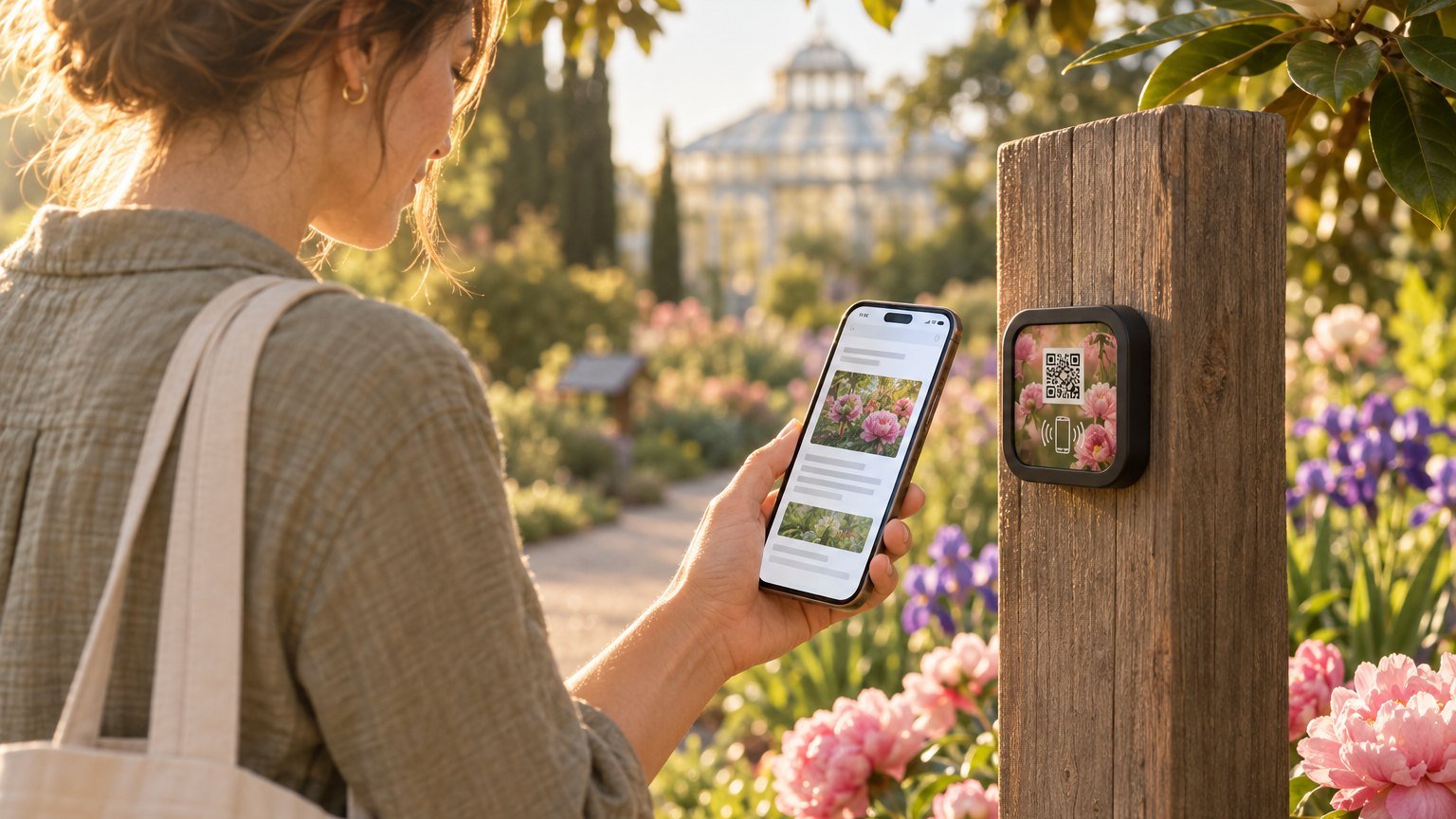
A NearField Marker is a three-inch square tile with an NFC chip inside and a QR code printed on its face. A visitor taps it with a phone or scans the code, and a web page opens, called an Experience. There's no app to install. The Marker is UV-resistant and rated for outdoor mounting, and it comes with mounting adhesive for a label post, a sign frame or the conservatory door.
What it opens is edited from a phone or a computer, so the tile never needs reprinting, and it can be re-pointed at a different Experience when a display ends. If you're weighing a Marker against a plain printed code, NFC vs. QR codes compares the two.
Build a page for a bed or a specimen
A page for a collection bed or a signature tree might run, from the top:
- A Promo Box with the current state of the bed, the one line you change weekly: "In bloom this week: the early tree peonies. The late varieties open in about ten days."
- A Heading and Text with the story: where the plant comes from, how it reached your garden, and what makes it worth stopping for.
- A Photo Gallery of the same plant through the year, so a visitor in August can see what it looked like in April.
- Audio with a transcript, a minute of your curator or a docent talking about the plant.
- An Accordion for what only some visitors want: how to grow it at home, its conservation status, its traditional uses, the names it goes by in other places.
- A Button to the next stop on the loop, or back to the garden map.
Where Markers earn their place in a garden
The entrance and visitor center
One garden-wide page: what's in bloom this week, Hours, an Event List for tours and plant sales, the garden map, and a Promo Box for closures. It replaces the whiteboard, and a visitor can reopen it from the middle of the garden.
Collection beds and themed gardens
One Marker at the head of the rose garden or the herb beds, not one per plant. The page names the plants, says what's happening this month and points out the one to look for.
Signature specimens
The champion oak, the tree an early director planted. Each gets a page with the history your volunteers tell on tours, for visitors who come on the other six days of the week.
The conservatory
A Marker at the door for the current show. When the show changes, rewrite the page and leave the Marker where it is.
Keeping pages current through the seasons
A routine small enough for one horticulturist to keep:
- Weekly in peak season: walk the collection and rewrite each bed's status line. One sentence is enough.
- Each season: add new photos to the galleries and swap the conservatory page.
- When a tree comes down or a bed is replanted: change the page the same day.
Visitors who read another language, or need the text larger
Every page carries the Inclusion Bar, on every plan. A visitor can switch the page into any of 20 languages, enlarge the text or turn on high contrast. If you choose a voice, it can read the page aloud. It doesn't make paths or beds accessible, but it gives a visitor who needs larger text, another language or audio the same story as everyone else.
Giving at the bed
If your garden runs an adopt-a-bed program, tribute trees or a plant conservation appeal, a Donate block takes a gift through your own Stripe account, right on the page for the bed or tree the visitor is standing beside. Conservation giving at the exhibit covers how to write that ask so it doesn't read like a toll booth.
How many Markers and pages you need
Several Markers can open the same page, so the entrance and the café can share the garden-wide page. A small garden can start there on the free plan, which runs 1 Experience on up to 3 Markers. Pages per bed take a paid plan: Starter ($19 a month) runs 3 live Experiences on up to 10 Markers, and Growth ($39 a month) runs 10 on up to 30. A garden with dozens of collections fits Enterprise ($299 a month), which has no practical cap on Experiences or Markers.
The first three Markers are $49 and ship free. Every one after that is $29, and the order still ships free.
Start with the bed people ask about
Start with the question your front desk hears most. If it's "what's in bloom?", build the garden-wide page first, put a Marker at the entrance and one at the busiest collection, and keep the status line for a month before adding bed pages.
The botanical garden template is built for a bed or specimen page: the weekly bloom line, the story, audio with a transcript, the bed through the seasons and the garden map. For how much to put on any panel, see digital exhibit interpretation. If your garden sits alongside animal exhibits, NFC for zoos covers those stops.
Ready to build?
Try it on one spot first
Build the page free, no credit card. When it reads right, three Markers are $49 and ship free.

Related guides
More for attractions: QR code & NFC for museums, galleries, and zoos →